

Download this page as a PDF [PDF, 451 KB]
Overview
For all NCEA external examination entries submitted to NZQA on time (by 1 September), each student will receive a personalised exam admission slip. This slip will include:
- an exam admission slip
- personalised exam booklets where the entry assessment method is paper.
For students with digital entries, buffer papers will be provided to your ECM based on 15% of the digital entry count for the session. Personalised papers are not provided.
Read more about the changes to digital entries
For all NZ Scholarship external examination entries in data files submitted to NZQA by 1 September, each student will receive:
- a printed exam admission slip
- personalised exam booklets for either paper or digital entries.
Buffer papers will continue to be provided to your ECM for NCEA and NZ Scholarship paper entries. Where applicable, the digital buffer is additional.
Buffer packs are only provided where entries have been made.
Late entries after 1 September
If you make entries after 1st September, the late entry process in this document must be followed.
The API will be unavailable between 2 and 6 September. It is due to be switched on at 10 am, 7 September.
During this time SAC attachments to examinations are on hold.
If you have any questions about late examination entries, please email logistics@nzqa.govt.nz.
On this page
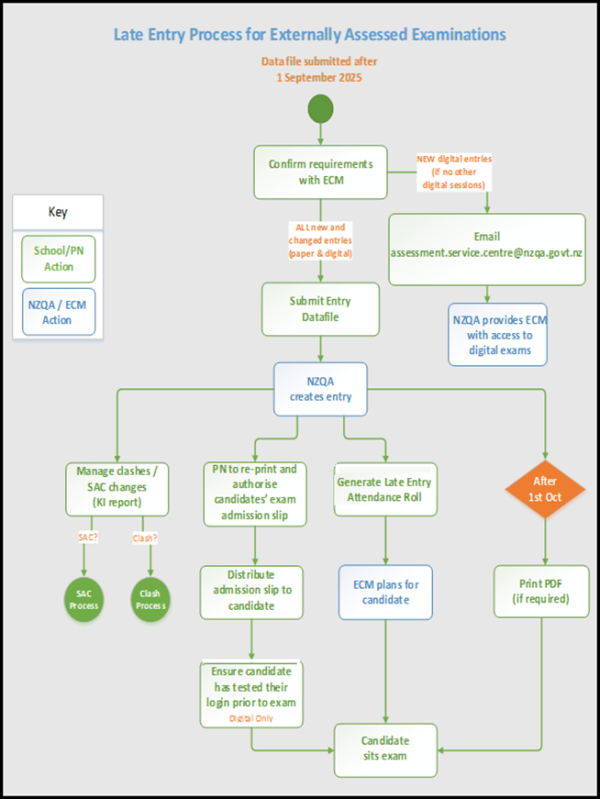
End-of-year timetabled exams late entry process
- If you are making late entries, or changes to the assessment method (digital/paper), update the entries using your SMS from 7 September. These changes will flow through to NZQA. Check that the updates have been made so that you can:
- update any SAC provisioning
- check for new clashes or changes of exam centre
- advise your ECM of any changes to assessment methods (digital/paper) or SAC information for students, clashes and exam centre changes
- liaise with your ECM to ensure appropriate resources (rooms, technicians, exam resource booklets) will be available for new digital entries
- generate the Late Attendance Roll(s) to ensure late entries have been processed.
- If you are making end-of-year digital entries for the first time (you have no other digital entries for end-of-year assessments submitted on or before 1 September), email assessment.service.centre@nzqa.govt.nz with the session and standard details so that we can set up a login for your ECM to access the digital platform. The email subject should read 'ECM login for digital exams required'.
- Print and sign new exam admission slips for all students with late or updated entries. These are accessed from your NZQA Provider Login, under Reports > Exam Reports > Exam Admission Slips.
- For late digital students, access the Candidate Account Register to check that students have created an account with NZQA. This report is accessed from your NZQA Provider Login, under Reports.
Late Attendance Rolls
The Late Attendance Roll report is available via Reports on the NZQA Provider Login.
This report generates Late Attendance Rolls by exam session (with late entry data auto-filled), which also provides a means to monitor and check your late entries have been processed by NZQA.
Your ECM also has access to this report. Liaise with your ECM and agree who will run the final report and agree the timing. We would recommend the day before the exam to ensure the most up to date data is available. If your ECM runs the reports, ensure they have access to a printer.
Provide your ECM any additional SAC information for late entry students if applicable.
Late entries submitted after 2 October
For late paper entries submitted by 2 October, NZQA will send additional non-personalised booklets (buffer papers) to your ECM.
For late digital entries submitted by 2 October we will provide additional resource booklets where applicable.
For entries submitted after 2 October, in addition to the steps above:
- Check with your ECM whether they have enough non-personalised booklets (buffer papers) for late entered paper entries, and late added SAC entitlements (readers/writers)
- Check with your ECM whether they have enough resource booklets for late entered digital entries and late added SAC entitlements (readers/writers.)
- Access the exam PDF on the day of the exam if your ECM does not have enough buffer papers or resource booklets. Information on the PDF download process and printing recommendations is available on this page.
Additional information
If your school is not an exam centre, liaise with the PN at your host exam centre urgently. You will need to submit the entries via your SMS. The host exam centre will help manage the late entry process and will generate the Late Entry Attendance Roll once entries have been processed.
If you have a request for a student to sit at another exam centre, follow The Request to Change Examination Centre process. Under no circumstances can exam booklets be moved between exam centres.
Request to change Examination Centre
The process for managing clashes can be found online:
- The due date for the PN to resolve 2-way exam clashes is 19 October.
- 3-way clashes must be resolved with SRM by 22 October.
Details of 2-way and 3-way clashes can be found in the Key Indicators link through your NZQA Provider Login at General Security Features > Key Indicators.
Submitted external assessments
Physical submissions
Information on the late entry process for NCEA levels 1 to 3 Design and Visual Communication and NCEA level 3 and NZ Scholarship Visual Arts can be found via the submission instructions on the relevant subject page.
Design and Visual Communication
8.5 Non-barcoded physical submissions [PDF, 1 MB](page 9)
10. Late submissions [PDF, 1 MB] (page 10)
Visual Arts NCEA Level 3 and NZ Scholarship
13. Materials for late entries [PDF, 803 KB] (from page 11)
Digital submissions
If late entries need to be made for subjects submitted via a digital upload, please ensure that the student entry is updated in your SMS and check that it has flowed through to NZQA.
If you experience any issues submitting with late entries or changes to the method of submission, please contact the NZQA Data Management & Learner Records team on 0800 697 296 or schools@nzqa.govt.nz
Literacy and Numeracy Assessment Event 2 (AE2) late entry process
Late entries for AE2 were due by 1 September; please follow the process below:
- Submit all entries via SMS Api or Web Entry by 1 September
- You can make further late entries via SMS Api or Web Entry from 7 September 2026 but please allow 24 hours processing time
- Reschedule the assessment day (if sitting the assessment online) once the student shows in Assessment Master or use the printed PDF for the student(s) with late entries
Any students who complete the assessment on paper must have their entry created before you can upload their scanned work. You will then need to follow the Late Submissions process.
2026 end-of-year exam paper PDF download process for Principal’s Nominees
If your ECM does not have enough exam booklets for students in an exam and/or you need to print special papers for SAC students, you can access PDF files on the day of the exam via the High Security section.
This link is only available if your school is an exam centre.
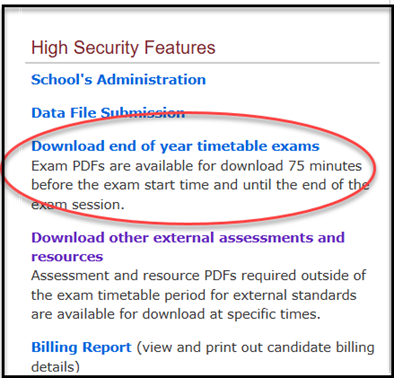
Exam Paper PDF files are available 75 minutes before the start date of the session until the end of the exam session e.g. for an assessment starting at 9:30 am, the PDF will be available at 8:15 am. For an assessment starting at 2:00 pm, the PDF will be available at 12:45 pm.
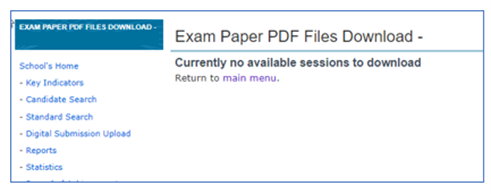
If you click on the link outside of the time parameters, the exam session files will not be displayed or be available for download.
When you click on the link within the time parameters described (after 8.15 am for morning exams and 12.45 pm for afternoon exams), the exam session(s) will be displayed and available for download.
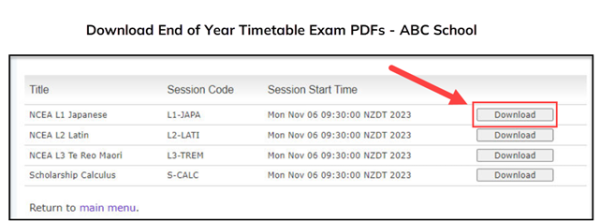
Once downloaded, the zipped files include the Question/Answer/Resource booklets for all standards in the session, including translated booklets where appropriate.
Please note that audio files are not included; your ECM has access to these.
When you click the download button, it may take a few minutes for the zipped file to download to your device depending on the file size. A percentage bar will be displayed, showing the status of the download.
An access code is required to open the PDFs. By downloading the file, an automated email is sent to the Principal’s Nominee (PN) email address.
The email is sent from webmaster.nzqa.govt.nz and includes:
- the access code to open the PDFs contained in the zipped file
- the ESAA ID of the requester.
If you don’t receive an email:
- check your junk mailbox
- check the PN email address is correctly set up.
If you have not downloaded the file and you receive an email, contact logistics@nzqa.govt.nz immediately.
We recommend that you check in the School Administration section that your PN contact details are correct. The PN is responsible for putting processes in place if they are unavailable during the exams period. Emails will only be sent to the registered PN email address.
If there are any issues accessing the files via the link you can call 0800 222 230 and request a PDF.
PDFs will be emailed to the PN’s email address and the access code sent via text to the PN’s cellphone number listed in their School Administration page.
Where possible when printing PDFs for end-of-year exams use the booklet function with staples in the centre fold or print onto A3 paper, then fold to A4 booklet format and staple in the centre fold. Please avoid corner staples as these cause problems in the scan and sort to marker processes.
For SAC students, print or use digitally as appropriate (e.g. for a Reader/Writer).