

Attaching SAC provisions to exam sessions – general guidance
The Special Assessment Exams Processing link on your SAC page for attaching SAC provisions to examinations opens on Wednesday 1 July. Guidelines on how to complete this process can be found on page 38 of the SAC Online Tool Guide:
SAC Online Tool Guide [PDF, 1.9 MB]
In general, students requiring Computer Use should complete the online digital exam using Assessment Master if this is available. However, if the school judges that there are significant reasons for a student to use a word processor, this can be provided. Please see Attaching SAC provisions to exam sessions – digital exam.
Please note the following:
- You can only complete this process once students’ external entries have been submitted to NZQA. Check with your PN if you are in doubt.
- This process only relates to external exam sessions in November. Other external assessment processes such as portfolios or submissions must be treated in the same way as internal assessments.
- SAC Update #2, 2026 provides advice on Separate Accommodation.
- Extra Writing Time may replace Computer or Writer in some exam sessions:
- If a Writer wishes to type, please select Writer but inform the ECM that a computer and printer will be needed.
- Further advice on SAC and exams.
- Please email the SAC team if you have any requests or queries about this process.
- Please aim to complete this process by 1 September to ensure that students who require specially printed papers or papers for exam assistant use receive them. Attachments past this date will still be processed, but special or personalised additional papers will not be available.
On this page
Attaching SAC provisions to exam sessions – digital exam
When attaching SAC provisions to exam sessions using the Special Assessment Exams Processing link in the online SAC tool accessed from the school's MyNZQA login, the type of exam the student has been entered for (Digital or Paper) is shown.
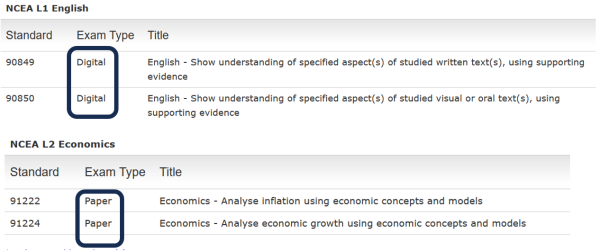
Most SAC provisions are available for students in both paper and digital exams. The following scenarios explain how to attach provisions if the student is entered for a digital exam.
|
Computer Only (CO)
|
Attach NR (SAC Not Required). The digital exam addresses the student’s need to use a computer.
|
|---|---|
|
Computer Use (CU) with Isolated (IS) or Small Group (SM) Separate Accommodation
|
|
|
Writer or Typist (WR) with Isolated Separate Accommodation (IS)
|
|
|
Reader (R) with Isolated Separate Accommodation (IS)
|
Attach Reader (R) and Isolated Separate Accommodation (IS).
|
|
Extra Writing Time (ET) or Rest Breaks (RB)
|
Attach Extra Writing Time (ET) or Rest Breaks (RB).
|
|
Enlarged Papers (EP) or Special Papers (SP) or Braille Papers (BP)
|
EP, SP and BP do not apply if the student is doing a digital exam and should not be selected unless the student requires this support in addition to what is offered in the digital exam option.
|
|
Signing Supervisor (SS) and Signing Reader (SR) for deaf students
|
Both SS and SR can be attached, but the use of a Signing Reader needs to be carefully planned.
|
Use of headphones (noise cancelling or otherwise) in exam sessions
If a student has a medical (or other) condition that requires them to use headphones for noise cancelling or for playing music, a SAC application for Separate Accommodation must be submitted. Use of headphones for general use is not an option for students in exams unless this relates to a language exam requirement.
If headphone use for students in separate accommodation is approved:
The student must be in separate accommodation (small group or isolated).
Any playlist used must be downloaded (that is, not streamed directly from the internet), and the playlist must be approved by the PN or SENCO to the ECM’s satisfaction.
The device used must be under the direct supervision of the exam supervisor.
Please inform the SAC team if you have any students who require this option so that we can note this for the ECM.
If a student wants to use earplugs or earmuffs (not connected to a device) as a choice, then this is not a SAC matter, and their use should be discussed with your ECM.
SAC webinars
We encourage you to register for the second series of SAC Webinars covering topics such as making examination entries, attaching conditions, preparations for school and external exams. There are two sessions with the same content. Please join a session by clicking on one of the links below.
Session 1 - Tuesday 23 June 11 to 11:45 am (external link)
Session 2 - Thursday 25 June 3:30 to 4:15 pm (external link)
Students requiring Braille papers
Co-requisite assessment
If you have a student requiring Braille papers for the second co-requisite assessment in September, please:
- Email the SAC team by Friday, 17 July so that we can confirm what is needed.
- Submit a SAC application (even if the student is in Year 9 or 10) by Friday, 17 July at the latest. We will not have time to prepare the Braille papers unless informed by this date.
- Contact the SAC team if you need to discuss this requirement.
End-of-year examinations
SACs for students requiring Braille papers must be attached to the examination sessions as early as possible and no later than Friday, 31 July. SAC applications for Braille papers cannot be approved after this date due to the significant time required for their production.
Previous SAC updates
Application deadlines
The deadline for submitting 2026 applications using the Notifications Gateway is the end of Term 3, Friday September 25. This is also the deadline for submitting Computer Only Notifications. From Term 4, Monday October 12, SAC applications can only be submitted using the Approvals Gateway.
The deadline for submitting 2026 applications under the Learning category is also the end of Term 3, Friday September 25. Applications under the Sensory, Medical or Physical categories can be made until the end of the exam period. Please submit these as early as possible.
Quality Assurance process completed
Sincere thanks to all Principal’s Nominees, SENCOs and SAC Coordinators who compiled and submitted supporting evidence for notifications made in 2025, enabling the quality assurance process to be conducted.
Overall judgements from the panel revealed that 75% of notifications met NZQA requirements, a further 13% met most NZQA requirements and 12% did not meet NZQA requirements. We would like to congratulate the four schools that have been recognised for the high quality of supporting evidence provided. All participating schools will be advised of the outcomes in due course. We will be sharing the good practice we have seen in future SAC updates.